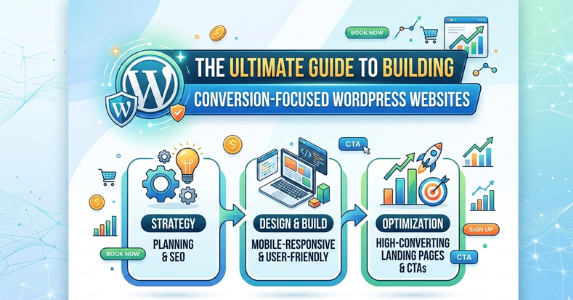
In 2026, a WordPress website is more than an online presence. It serves as a revenue-generating asset that turns visitors into leads, customers, and loyal advocates. With average website conversion rates hovering around 2.9 to 3.1 percent across industries and ecommerce benchmarks sitting between 2.5 and 3 percent, most sites leave massive potential untapped. Building a conversion-focused WordPress site means prioritizing user experience, speed, trust signals, clear calls to action, and data-driven optimization from the start. This comprehensive guide walks through every essential step to create a high-performing WordPress website optimized for conversions in 2026.
Why Conversion Focus Matters More Than Ever
A one-second delay in page load time can reduce conversions by up to 20 percent, while 53 percent of mobile users abandon sites that take longer than three seconds to load. Search engines reward fast, user-friendly experiences with better rankings, and platforms like Google emphasize Core Web Vitals as ranking factors. Conversion rate optimization, or CRO, maximizes the value of existing traffic instead of relying solely on more paid ads or SEO. High-converting WordPress sites typically feature clear value propositions, minimal friction, strategic calls to action, and mobile-first design. Businesses that implement these elements often see conversion lifts of 20 to 40 percent or more through targeted improvements.
Step 1: Define Your Conversion Goals and Audience
Before installing WordPress, clarify what conversion means for your business. Common goals include form submissions, purchases, newsletter sign-ups, booking requests, or demo requests. Benchmark your industry: professional services average around 4.6 percent, financial services near 8.3 percent, and ecommerce between 2.5 and 3 percent globally.
Create detailed buyer personas. Understand pain points, motivations, objections, and preferred devices. Use tools like Google Analytics or surveys to gather data. This foundation ensures every design and content decision aligns with moving the right visitors toward action.
Step 2: Choose Reliable Hosting and Domain
Performance starts with hosting. In 2026, select managed WordPress hosting optimized for speed, such as providers with built-in caching, CDN integration, and automatic scaling. Avoid shared hosting for conversion-focused sites, as it often leads to slower load times during traffic spikes.
Pick a domain name that is short, memorable, brand-relevant, and includes keywords where natural. Use HTTPS by default for trust and minor ranking boosts.
Step 3: Install WordPress and Select a Lightweight, Fast Theme
WordPress powers over 43 percent of websites, offering unmatched flexibility. After installation, choose a performance-oriented theme. Popular lightweight options in 2026 include Astra, GeneratePress, Kadence, and Neve. These load quickly, score high on Core Web Vitals, and integrate seamlessly with page builders.
Avoid bloated multipurpose themes that include unnecessary features. A fast theme reduces initial load time, which directly impacts bounce rates and conversions.
Step 4: Use a Powerful Page Builder for Conversion-Optimized Layouts
Drag-and-drop builders enable non-coders to create high-converting pages. Elementor, SeedProd, and Thrive Architect stand out for conversion focus. SeedProd excels at landing pages with built-in templates designed for lead capture. Thrive Architect prioritizes marketing elements like opt-in forms, testimonials, and urgency timers. Elementor offers extensive widgets for dynamic content and WooCommerce integration.
Build with these principles:
- Hero sections with strong headlines, subheadings, and primary calls to action above the fold.
- Single-focused pages for key offers to reduce decision fatigue.
- Thumb-friendly mobile layouts, as mobile traffic dominates.
Step 5: Optimize Site Speed for Better User Experience and Rankings
Speed is a top conversion lever. Implement these optimizations:
- Install a caching plugin like WP Rocket or LiteSpeed Cache.
- Compress images with tools like ShortPixel or Smush.
- Use a CDN such as Cloudflare.
- Minify CSS, JavaScript, and HTML.
- Enable lazy loading for images and videos.
- Optimize database regularly.
Aim for load times under two to three seconds. Test with Google PageSpeed Insights and GTmetrix. Faster sites improve dwell time, lower bounce rates, and boost conversions.
Step 6: Craft Compelling, Persuasive Content and Copy
Content drives trust and action. Use clear, benefit-focused headlines that address visitor needs immediately. Incorporate social proof through testimonials, case studies, client logos, and reviews. Add trust badges, security seals, and money-back guarantees.
Write concise, scannable copy with bullet points, short paragraphs, and subheadings. Place strong calls to action throughout, using action-oriented language like “Get Started Now” or “Claim Your Free Trial.” Personalize where possible with dynamic content based on user behavior.
Step 7: Design Strategic Calls to Action and Forms
Every page needs clear, contrasting calls to action. Use large, colorful buttons with whitespace around them. Limit forms to essential fields; shorter forms convert better. Tools like WPForms or Gravity Forms allow conditional logic and multi-step processes to reduce abandonment.
For ecommerce, optimize checkout with one-page flows, guest options, and progress indicators.
Step 8: Integrate Essential Plugins for CRO and Functionality
Key plugins enhance conversions without bloating the site:
- Yoast SEO or Rank Math for on-page optimization and readability.
- WP Rocket for performance.
- OptinMonster or Thrive Leads for pop-ups and lead magnets.
- MonsterInsights for Google Analytics tracking.
- WooCommerce for stores, with extensions like cart abandonment recovery.
- Hotjar or Microsoft Clarity for heatmaps and session recordings to identify friction points.
Limit plugins to essentials and choose lightweight alternatives.
Step 9: Implement A/B Testing and Continuous Optimization
Launch with a baseline, then test. Use Google Optimize (or alternatives like Nelio A/B Testing) to experiment with headlines, button colors, layouts, and offers. Analyze results with statistical significance.
Monitor metrics like bounce rate, time on page, conversion rate by device, and funnel drop-offs. Iterate monthly based on data.
Step 10: Ensure Mobile Optimization and Accessibility
Mobile-first design is non-negotiable. Test responsiveness across devices. Follow WCAG guidelines for accessibility to broaden reach and avoid legal issues. Accessible sites often convert better due to improved usability.
Final Checklist for Launch and Ongoing Success
Before going live, audit:
- Load speed under three seconds.
- Mobile responsiveness perfect.
- Clear primary call to action on every page.
- Trust elements visible.
- Forms tested and integrated with email tools.
- Analytics and tracking set up.
- Backup and security plugins active (Wordfence or Sucuri).
Post-launch, review performance weekly at first, then monthly. Update content, test new elements, and refine based on real user data.
Building a conversion-focused WordPress website in 2026 requires strategy over flash. Prioritize speed, clarity, trust, and testing to turn traffic into measurable growth. Start with solid foundations, iterate relentlessly, and watch your conversions climb.